localthings as an alternative to a Google Maps embed
There are two common ways to put Google Maps on your website. The free Maps Embed API shows one place, a route or search results. For a map of all your own locations, a developer usually builds something custom with the Maps JavaScript API, which can do almost anything. localthings is the narrower choice when you want to manage those locations yourself, without a developer.
- The Maps Embed API is free with unlimited usage, and shows one place, a route, Street View or search results in an area. Your own list of locations is not part of it.
- A map of all your own locations usually means a custom build with the Maps JavaScript API: fully flexible, but a developer builds it and a production key needs a Google Cloud account with billing.
- In a custom build the locations live in code or in a database the developer connects. A change then goes through that developer, unless an admin screen was built for it too.
- In localthings you manage the locations yourself, in a table of all your locations or straight on the map. Once you publish, changes are live, including in the embed on your website. Embedding starts on Basic.
localthings vs. Google Maps embed or custom build
A factual comparison on the points that matter to most people.
| Feature | localthings | Google Maps embed or custom build |
|---|---|---|
| One address on a map on your website | Embed from Basic | Free with the Maps Embed API |
| A map of all your own locations | Custom build (Maps JavaScript API) | |
| Update locations yourself, no developer | In a table or on the map | Only with a custom-built admin screen |
| Changes go live in the embed straight away | Depends on how it was built | |
| Category filters, list view and location cards | Built by your developer | |
| Free-form interaction and links to your own systems | Fixed map builder with your own fields | |
| View and restore versions | From Basic | Through your own development process |
| No API key or Google Cloud account of your own | ||
| Visitor statistics for your map | On Premium | Through your own analytics |
When a Google Maps embed or custom build fits better
Choose the free Maps Embed API when you want to show one address, a route or an area, for example on a contact page. Choose a custom build with the Maps JavaScript API when the map has to live deep inside your own product, with live data from your own systems or interaction no map builder offers, and you have a developer to build and maintain it.
When localthings fits better
Choose localthings when you have many locations of your own that change often, such as branches, stockists, event venues or facilities, and you want to update them yourself. You change a location in the table or on the map, see what will go live before you publish, and publish. No ticket and no release.
One map, updated without a new release
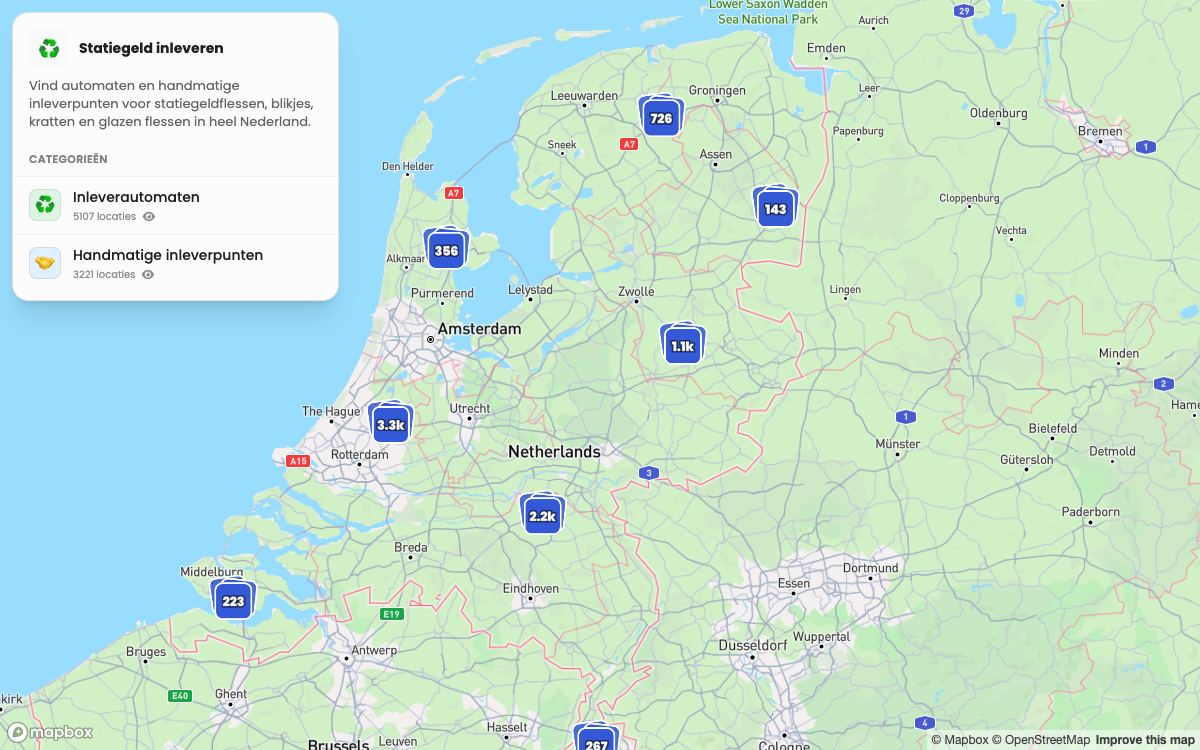
This published localthings map turns 8,328 imported addresses into a map and list. When the data changes, the same link and the same embed simply stay current.
- 8,328 addresses, split across two visitor-facing categories.
- Points cluster automatically until the visitor zooms into a street.
- Every location opens its own description from the imported data.
- The same public link stays current when the map data changes.
Frequently asked questions
Can I put a map with multiple locations on my website without a developer?
Yes. The free Maps Embed API shows one place, a route or search results, not your own list of locations. In localthings you import or paste your locations, give the map your branding and, from Basic, embed it with one snippet, with no API key of your own.
Who updates the locations when something changes?
You do. In localthings you edit categories and your own fields in the table of all your locations, and the location itself straight on the map, including dragging it to a new spot. Once you publish, the change is live, including in the embed on your website. From Basic, version history lets you restore an earlier version.
Can I move over from a custom-built map?
Yes. Export your locations as CSV from your own system and import them into localthings, or paste the rows directly. Then set up categories, colours and fields, and replace the old map on your website with the embed code. On Custom we set up the map and the migration for you.
What does localthings cost?
Free includes one map with up to 100 visible locations and a permanent link. Embedding starts on Basic; a custom domain and analytics are Premium; branding removal is Custom.